Ask questions across your documents without uploading them.
PortableRAG is a local-first desktop app that helps you search, chat with, and verify answers from your files. Your documents stay on your device by default.
- Runs on your computer
- Every answer shows its source
- No account needed
macOS early access first. Windows coming next.
The privacy problem
Your most useful documents are often the ones you cannot upload.
Most people don't have an AI problem. They have a privacy problem. The files where AI would help most are exactly the ones you'd never paste into a cloud chatbot.
You want the help. You just can't take the risk. Until now, that's been the trade-off.
See how it works
A folder of documents, turned into a cited answer.
Recorded from the current macOS developer preview. No audio narration.
Read a text description of the recording
- PortableRAG opens on a welcome screen: create a private knowledge project; documents stay on your computer.
- A new project is named and a documents folder is chosen — everything stays on this Mac.
- PortableRAG indexes the documents locally on the device.
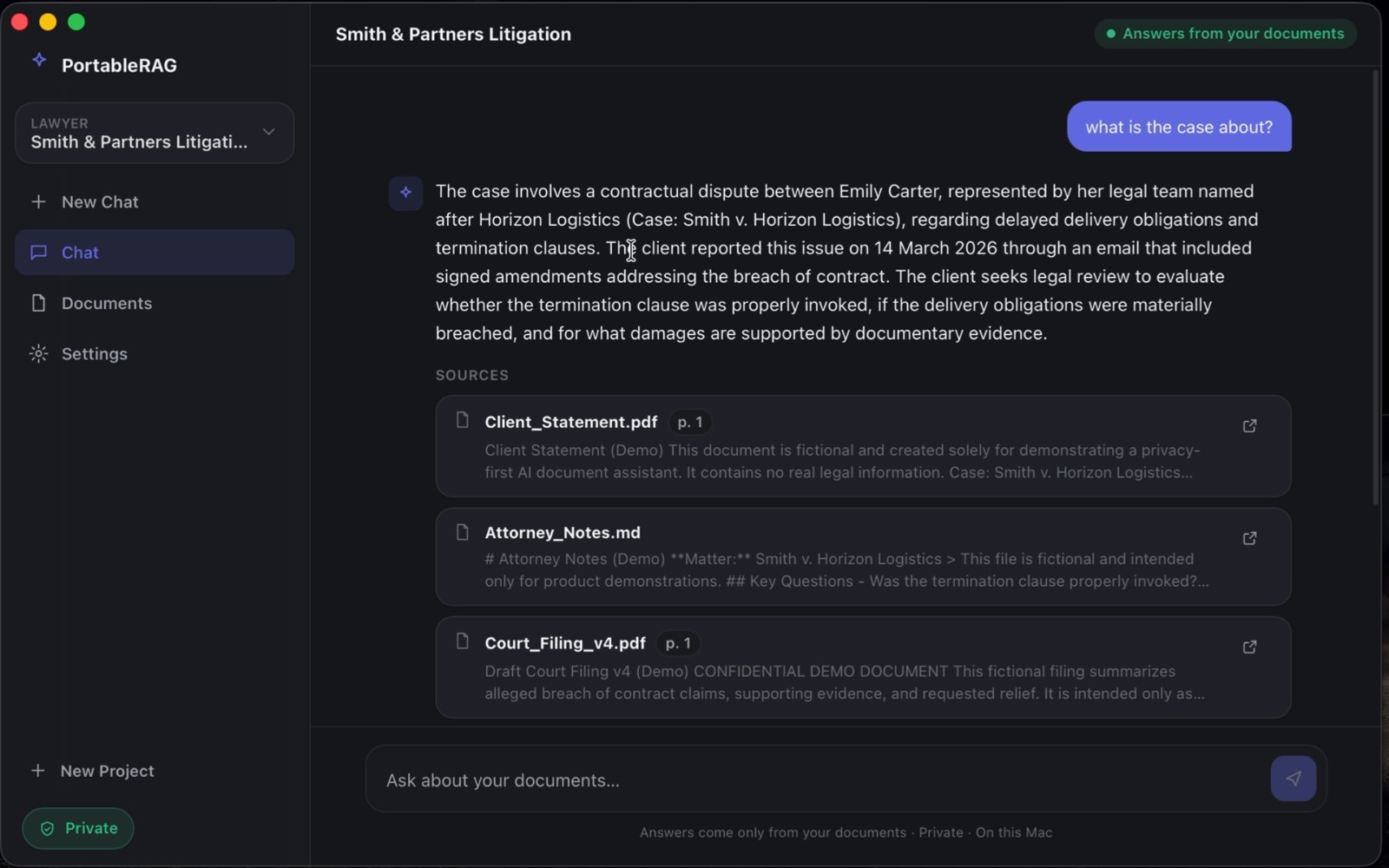
- In the chat, a question is typed: “what is the case about?”
- A cited answer appears, with a Sources list (Client_Statement.pdf, Attorney_Notes.md, Court_Filing_v4.pdf) you can open to the exact passage.
- Settings show the privacy model: everything stays on this Mac, network access off, and project data you can delete at any time.
Why people use it
Private by default. Verifiable by design.
Three things PortableRAG gives you that a cloud chatbot can't — without sending your files anywhere.
Keep sensitive files under your control
Add a folder and start asking questions. Your documents and your questions stay on your computer by default — nothing is uploaded to a server to make PortableRAG work.
Verify every answer in one click
Each answer is linked to the exact passage it came from. Open the source, read it in context, and trust the answer because you can check it.
Find the right passage without exact wording
Search by meaning, not just keywords. Ask the way you'd ask a colleague and PortableRAG surfaces the relevant text even when your phrasing doesn't match the document.
The local alternative
PortableRAG brings AI to your documents — locally.
Instead of sending files to a server, PortableRAG runs the AI on your own computer. Every answer comes with a citation back to the exact source. By default, your documents stay on your machine — enabling an optional cloud model is the only thing that would send selected content elsewhere.
By default, everything stays on your machine.
Under the hood (for technical readers)
How a question becomes a cited answer:
- 1
Find the right passage
Hybrid search combines meaning and exact keywords, so the most relevant passages surface even when your wording doesn't match the text.
- 2
Surface the strongest evidence
Candidate passages are reranked so the best evidence rises to the top before anything is answered.
- 3
Answer on your machine
A model running on your own computer composes an answer, grounded in that evidence — no cloud round-trip by default.
- 4
Check it against the source
Every answer links back to the exact passages it used, so you can verify it against the original document.
Who it's for
For professionals with documents they can't upload.
Individuals in legal, research, finance, and internal business work — including people inside larger teams — who need a private way to search their own document collections.
A day with PortableRAG
“Find every renewal clause across a folder of contracts, ask follow-up questions, and open the exact source paragraph behind each answer.”
Point PortableRAG at the folder, ask in plain language, and it pulls the relevant passages from every file — each answer linked back to the page it came from. Nothing leaves your computer to do it.
Legal & contracts
Search across contracts, discovery, and case files, and open the exact clause behind every answer — without sending privileged material to a third party.
Research & knowledge work
Ask questions across papers, notes, and reports, with each claim traceable to its source so you can cite with confidence.
Internal company documents
Search policies, board notes, and financial records privately, without putting confidential files in someone else's cloud.
Personal study & archives
Turn a semester of readings or a lifetime of personal documents into something you can question — and that cites its sources.
PortableRAG keeps your documents on your device by default. It is not independently audited or certified for HIPAA, GDPR, or SOC 2, and is not a substitute for professional advice — use your own judgment and follow your organization's policies for regulated data. See the Privacy Promise for details.
Transparency
Where your data goes — and what it can't do yet.
The short version, stated plainly. The full detail lives on the Privacy and Security pages.
By default, on your Mac
Documents are read, indexed, and answered on your device. Your files and questions don't need to leave your computer to get an answer.
External models are opt-in
You can choose to configure a cloud model. Only then, and only for what you send, does document text reach an external provider.
The website is separate
This site's analytics and the early-access form are separate from the app and never receive your document contents.
Current limitations
- It's a private developer preview — not a public release. macOS on Apple Silicon is first; Windows and Linux are planned.
- Preview builds aren't notarized by Apple yet, so evaluate with sample or non-sensitive documents until signed builds are available.
- Scanned or image-only PDFs aren't supported yet (no OCR). Text-based PDFs, Word, and plain text work today.
- It's a single-user desktop app. Shared team workspaces are planned, not available now.
A different default
The difference is where the work happens.
For the documents where the answer has to stay on your computer.
Your documents stay on your device
No account needed
Works without internet
Every answer shows its source
Runs AI on your own computer
Designed for confidential files
Hosted AI services vary by product and configuration; this compares the typical cloud-upload workflow with PortableRAG's local-first default.
Platforms
Starting on macOS. Windows is next.
One local-first experience across platforms, rolling out one at a time so each is done right.
macOS
Early access is opening first on macOS. Join to help shape it and get the first test build.
Windows
Windows is coming next. Join the waitlist to be notified when the Windows build is ready.
Pricing
Free during private preview.
Early access is free while I finalize the product. Pricing details will be shared before general release — early users will get first notice.
Want to test PortableRAG?
I'm opening early access to people who work with private documents. macOS is first; Windows is next.
Questions